If you’ve seen a book page on Amazon with large images, styled text and a chart of other books in the series, you’ve seen A+ Content. It’s one of the most underused marketing tools available to self-published authors, and it’s free.
What is A+ Content?
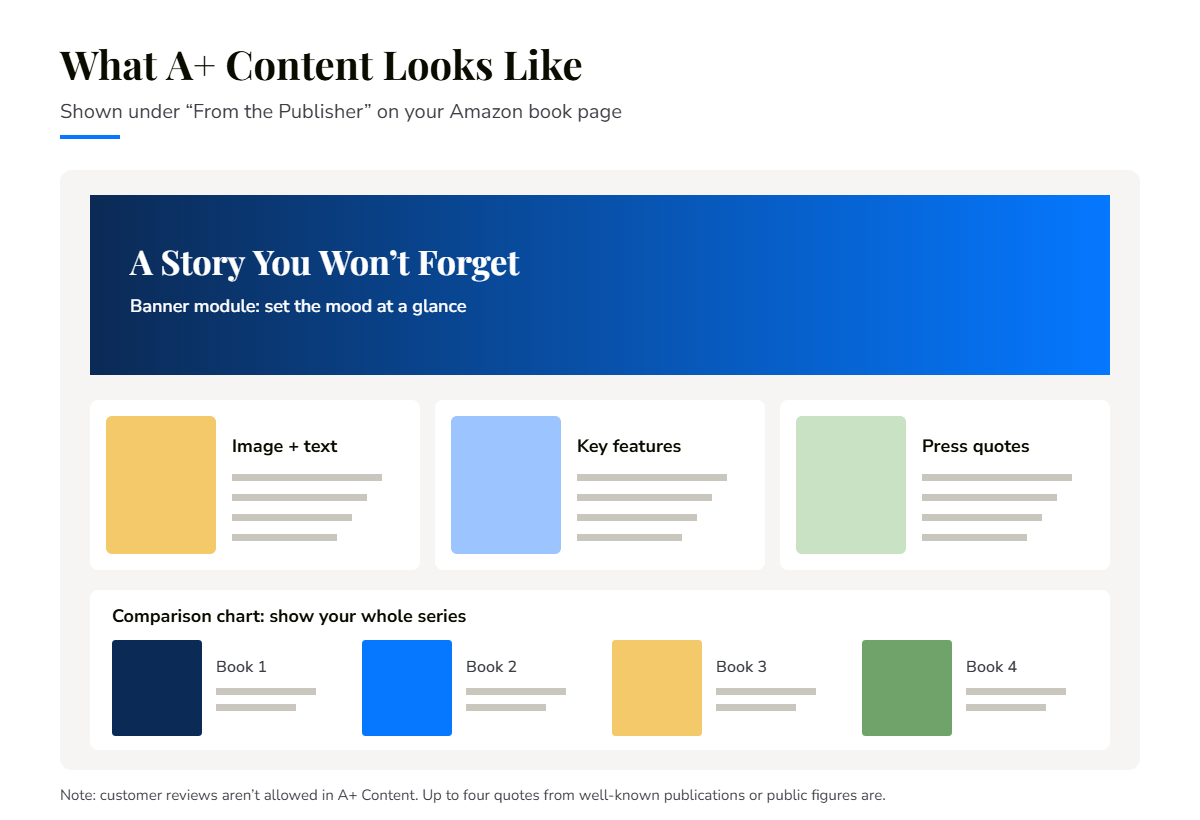
A+ Content lets you add images, text and comparison tables to your book’s Amazon detail page. It appears in the “From the Publisher” section, separate from your book description. Readers usually need to scroll down to see it, so it works best for people who are already interested and want to know more before buying.
You create it from the Marketing section of your KDP account, using ready-made layout blocks called modules.
What you can show
- A banner image that sets the mood of your book.
- Image and text modules showing interior pages, characters, settings or key ideas.
- Highlights of what readers will learn or experience.
- A comparison chart of the books in your series, so readers know where to start and what to read next.
- Your author story, to connect readers with you.
What isn’t allowed
Amazon reviews every A+ submission and will reject content that breaks its guidelines. Common things to avoid:
- Customer reviews. These aren’t allowed in A+ Content. You may include up to four quotes or endorsements, only from well-known publications or public figures, with the source named.
- Boastful or satisfaction claims, such as “#1 rated” or “100% satisfaction guaranteed.”
- Blurry or low-quality images, or small text that can’t be read on a phone.
- Images or text that imitate Amazon’s logos or page headings.
Tips for A+ Content that works
- Design for mobile. Most shoppers browse on their phones, so keep text large and images simple.
- Match your cover. Use the same colours, fonts and style so your page feels like one brand.
- Show, don’t repeat. Use images to add something your description can’t, such as a look inside the book.
- Promote the series. A comparison chart is one of the easiest ways to sell your next book.
Want A+ Content that looks professional?
We design A+ modules that match your cover and follow Amazon’s guidelines, ready for you to upload in KDP.
See our KDP A+ Content service or book a free 30-minute call.