Trim size is the final physical size of your printed book: its width and height after the pages are cut. It’s one of the first decisions you’ll make when publishing a paperback, and it affects almost everything that follows, from layout and page count to printing cost and cover size.
Why trim size matters
- Page count: a smaller trim size fits fewer words per page, so the book has more pages.
- Printing cost: on print-on-demand platforms, cost is based partly on page count, so trim size affects your royalty.
- Reader expectations: readers are used to certain sizes for certain genres. A novel printed at workbook size looks out of place.
- Cover size: your cover is designed for one exact trim size and page count.
The most popular trim sizes
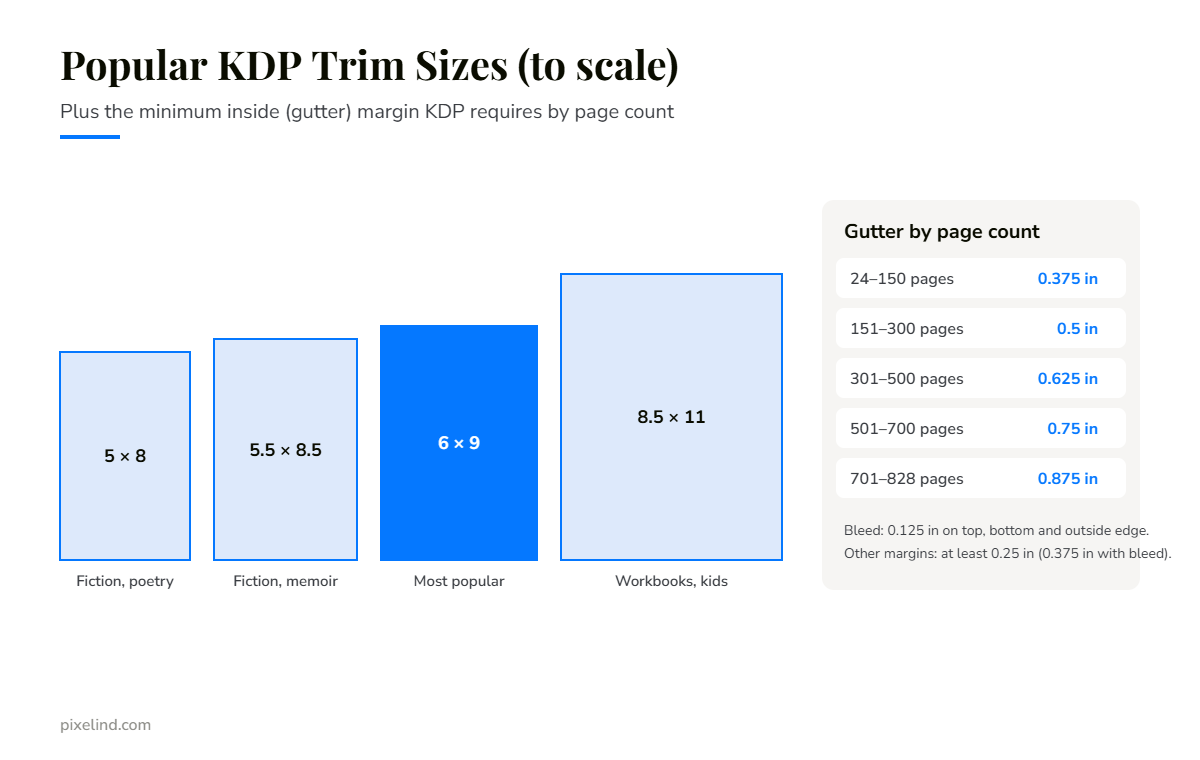
- 5 × 8 in: compact and affordable. Popular for fiction, poetry and short non-fiction.
- 5.5 × 8.5 in: a classic size for novels, memoirs and personal development books.
- 6 × 9 in: the most common choice for both fiction and non-fiction. A safe default if you’re unsure.
- 7 × 10 in: useful for textbooks, guides and books with images.
- 8.5 × 11 in: letter size. Best for workbooks, journals, activity books and many children’s books.
Margins and the gutter
The gutter is the inside margin, next to the spine. As a book gets thicker, more of each page curves into the binding, so Amazon KDP requires a bigger inside margin for longer books. The minimum gutter rises from 0.375 in for books of 24–150 pages up to 0.875 in for books of 701–828 pages. The outside, top and bottom margins must be at least 0.25 in, or 0.375 in if your book uses bleed.
These are minimums. Professional layouts usually use more generous margins so the text is comfortable to read.
What is bleed?
Bleed means an image or background colour runs right to the edge of the page. For bleed, KDP needs an extra 0.125 in on the top, bottom and outside edge, which is trimmed off after printing. Most text-only books don’t need bleed. Children’s books, cookbooks and illustrated books often do.
How to choose
- Look at your genre. Pick three bestselling books similar to yours and check their trim size on Amazon.
- Think about page count. A long novel at 5 × 8 in can become very thick. A larger trim size can keep it manageable.
- Plan for every platform. If you also want to publish through IngramSpark, choose a standard size that both platforms support.
- Decide before formatting and cover design. Changing trim size later means redoing the layout and resizing the cover.
Not sure which size to choose?
Tell us about your book and we’ll recommend the right trim size for your genre, then format it to meet KDP’s requirements.
Explore our formatting service or book a free 30-minute call.